
Frequently asked questions
Everything you need to know about Blisterr, from Peeks and Lives to payments and delivery.
Popular questions
🎉 Welcome to Blisterr(4)
What is Blisterr?
Blisterr is a French marketplace for live auctions and video Peeks, made for pop culture and collecting enthusiasts.
Items to discover on video
Buy and sell cards, figurines and retro items through Peeks and Lives.
How do I create an account?
Signing up is free and instant.
- Enter your email address.
- Receive a secure login code.
- Link your phone number.
Who is behind Blisterr?
Blisterr is a French company based in Bayonne (BLISTERR SAS), founded by Emeline and Amandine, joined by Matthieu. We are fans of TCGs, figurines and retro items, and we are building the marketplace we wished we could find.
How do I contact support?
Reach us on Discord, through the contact form on the website or by email: support@blisterr.com.
Our team replies by email.
🎯 Sales formats(10)
What sales formats are available on Blisterr?
Choose from five sales formats:
Instant buy
The price is fixed. You buy at the listed amount.
Example: €25 → buy for €25
Classic auction
Bids are visible. You can outbid other buyers.
Example: €20 → €22 → €25
Silent auction
You offer your best price without seeing other buyers’ bids.
Example: your €25 bid stays hidden
Drop
The price drops automatically from a starting price to a floor price. The first buyer to click Buy wins the item.
Example: €30 → €25 → €20
Giveaway
A free prize draw among eligible participants.
Example: several participants → one winner
As a Peek or during a Live
These formats can be offered in a short video (Peek) or during a live stream (Live). The amounts above are examples.
What is the difference between a classic auction and a silent auction?
Classic auction
You see bids in real time and can offer a higher amount.
Silent auction
Other buyers’ bids are not visible. Offer your best price.
Who wins the lot?
In both cases, the best bid wins when the countdown ends. A bid is firm and irrevocable.
How does the Drop format work?
- The seller sets a starting price, a floor price and a duration.
- The price drops automatically, in whole euros, down to the floor.
- Click Buy: the item is yours at the price shown at that instant.
Wait or buy?
The price drops, but another buyer may beat you to it. In a Live, a Drop lasts between 10 and 60 seconds.
How does a giveaway work?
- The seller chooses who can take part: everyone, their followers or their past buyers.
- Eligible participants enter for free.
- When the countdown ends, a winner is drawn at random.
Seller side
The item is offered by the seller, who also pays for delivery to the winner. No buyer protection fee is due for a giveaway.
What happens if the seller loses their connection during a Live?
Short outage
The seller can resume almost immediately. The Live stays recoverable for 10 minutes.
Longer interruption
Blisterr prepares a new broadcast space. The seller waits on the preparation screen, without recreating the event.
Once the broadcast is ready, the seller and viewers resume automatically.
After 10 minutes
The Live ends. The replay keeps the footage that was actually recorded.
How long does a Live last?
A Live lasts two hours at most: it stops automatically. By default, each lot is sold in 30 seconds.
Last seconds
In a Live, a bid placed when less than 15 seconds remain brings the countdown back to 15 seconds, within a limit of one hour per lot; the seller can turn this option off. Peek auctions end at the displayed time.
Which format should I pick as a buyer?
- You want the item now, with no surprise: instant buy.
- You are chasing a rare piece with a flexible budget: classic auction.
- You do not want to reveal your maximum price: silent auction.
- You are waiting for the right price: Drop.
- You want the social experience and the thrill of the live: Live.
- You want to try your luck for free: giveaway.
Which format should I pick as a seller?
- Instant buy for items whose price is known.
- Classic or silent auction for rare pieces you want the market to price.
- Drop to test a price without setting the final amount in advance.
- Giveaway to thank and grow your community.
- Live to sell several items in one session and create an event.
Are all formats available on web and mobile?
On mobile
The mobile app covers every format, with an experience designed for Lives and video Peeks.
On the web
Buy, bid and track your orders from your browser, once signed in to your account.
Are the fees the same across formats?
Yes. Blisterr applies 0% seller commission on every format, and the same buyer protection fee (6.9% of the item price + €0.49 per order) regardless of the format.
One exception: no buyer protection fee is due for a giveaway. Delivery costs vary depending on the shipping mode and the destination.
🛒 Buying on Blisterr(11)
What personal information do I need to provide to buy?
Before your first purchase, get ready:
- Your first name, last name and date of birth.
- At least one valid postal address.
- A card payment method.
- For lives: a default pickup point, where your live purchases will be delivered.
How do I find an item?
Explore
Browse the Peek feed on the home screen or visit a shop.
Search
Use search and filter by category, price, seller or condition.
How do I buy from a Peek?
Instant buy
Click Add to cart.
Auction
Place your bid in a classic or silent auction.
Drop
Click Buy before the other buyers.
Giveaway
Enter for free if you are eligible.
What are the two types of auctions?
Classic
Every bid is visible in real time.
Silent
Other buyers’ bids are not visible.
A bid is firm
If you are the highest bidder at the end, you commit to buying the item: a bid cannot be withdrawn.
How do I complete an order?
Step 1
Check your cart
Review the items and quantities, then click Next.
Demo data · Click to enlarge ↗ Step 2
Choose your address
Select the address where you want to receive your order.
Demo data · Click to enlarge ↗ Step 3
Choose delivery
Compare the shipping options offered by the seller and their costs.
Demo data · Click to enlarge ↗ Step 4
Choose how to pay
Use your wallet, your card or both, depending on your available balance.
Demo data · Click to enlarge ↗ Step 5
Review and confirm
Read the summary and the total, delivery and buyer protection fee included. Click Pay to confirm.
Demo data · Click to enlarge ↗
How do I buy in a Live?
- Open the Live tab.
- Join the stream you are interested in.
- Bid, or buy at a fixed price, from the live screen.
To take part in sales, your profile must be complete, with at least one address, a saved card and a default pickup point.
How long do I have to pay for a won auction?
4 days to pay for your purchase
After that, the item is put back on sale and a strike is added to your account: for 6 months, your auctions are limited to your wallet balance. Your card purchases remain possible.
In a Live, payment is triggered automatically at the end of the sale, with your wallet and/or your default card. If it fails (3D Secure, bank refusal), you have 4 days to sort it out.
How do I track my order?
Step 1
Open your orders
In the menu, choose Orders, then select the purchase concerned.
Demo data · Click to enlarge ↗ Step 2
Check the tracking
Find the order status and the carrier information.
Demo data · Click to enlarge ↗
What should I do if there is a problem with my order?
Step 1
Contact the seller
Open your order details, then Contact the seller. Explain the problem you ran into.
Demo data · Click to enlarge ↗ Step 2
Ask Blisterr for help
If the seller does not help you, contact our team at support@blisterr.com (or on Discord) with photos and proof. We review your case; if a refund is decided, it is credited to your wallet.
How does buyer protection work?
Blisterr’s buyer protection applies for 30 days after you receive the item (or after the expected delivery date if it never arrives), for sales by private and professional sellers.
- Item not received.
- Item damaged.
- Item materially different from its description.
- Proven counterfeit.
Only on Blisterr
Protection applies to payments made through Blisterr. It adds to your legal rights and does not replace them.
How do I add an item or a shop to my favourites?
For an item
Tap the heart from the Peek.
For a shop
Open its page, then tap Follow.
🏪 Selling on Blisterr(12)
How do I become a seller?
- Open the + Sell tab.
- Fill in the application form: individual or professional profile, categories, social links, presentation video and Stripe identity verification.
- Our team reviews your application manually. It may send it back with remarks to complete before approval.
What do I need to provide for my seller application?
You complete your profile and your legal information according to your status (individual or professional). A professional seller provides their SIRET number, legal form and VAT regime.
- The categories you sell in.
- One to ten links to your social networks.
- A presentation video.
- Stripe identity verification, completed during the application.
How do I create a Peek?
Step 1
Add your video
From + Sell, open the Peek creation. Upload the video of your item (60 seconds maximum) and, if you wish, a cover image.
Demo data · Click to enlarge ↗ Step 2
Describe your item
Enter its category, title, description, condition and weight.
Step 3
Prepare the sale
Choose the format and the price. You can also schedule your Peek.
What sales formats exist?
- 🛍️ Instant buy.
- 🔨 Classic auction.
- 🤫 Silent auction.
- 📉 Drop: the price drops, the first buyer to click wins the item.
- 🎁 Giveaway: a free prize draw, with delivery at your expense.
Each format can be offered in a Peek or during a Live.
How do I launch a Live?
Step 1
Create your Live
From + Sell, choose Create a Live. Add a cover and, optionally, an introduction video.
Demo data · Click to enlarge ↗ Step 2
Prepare your event
Enter the category and the title. You can add items, write a notification and schedule the broadcast.
Step 3
Choose how to broadcast
From the preparation screen, select the Blisterr camera or streaming software. For OBS, find the settings below.
Demo data · Click to enlarge ↗
Two hours at most
A Live lasts two hours at most: it stops automatically.
Set up OBS for your Blisterr Live
Streaming from your computer with OBS Studio? Connect your scene to Blisterr and limit the delay added by encoding before presenting your items.
Before you start
Prepare your scene and microphone in OBS, then create your Live in the Blisterr seller area. At the broadcasting step, choose streaming software.
1. Connect OBS to your Live
- In OBS, open Settings → Stream.
- Choose WHIP from the Service menu.
- Copy the server address shown for your Blisterr Live into Server, then copy the token into Bearer Token. Click Apply.
The token lets someone broadcast to your Live: keep it private. The screenshot fields are intentionally empty; use the values from your own Live.
Official OBS documentation: WHIP connection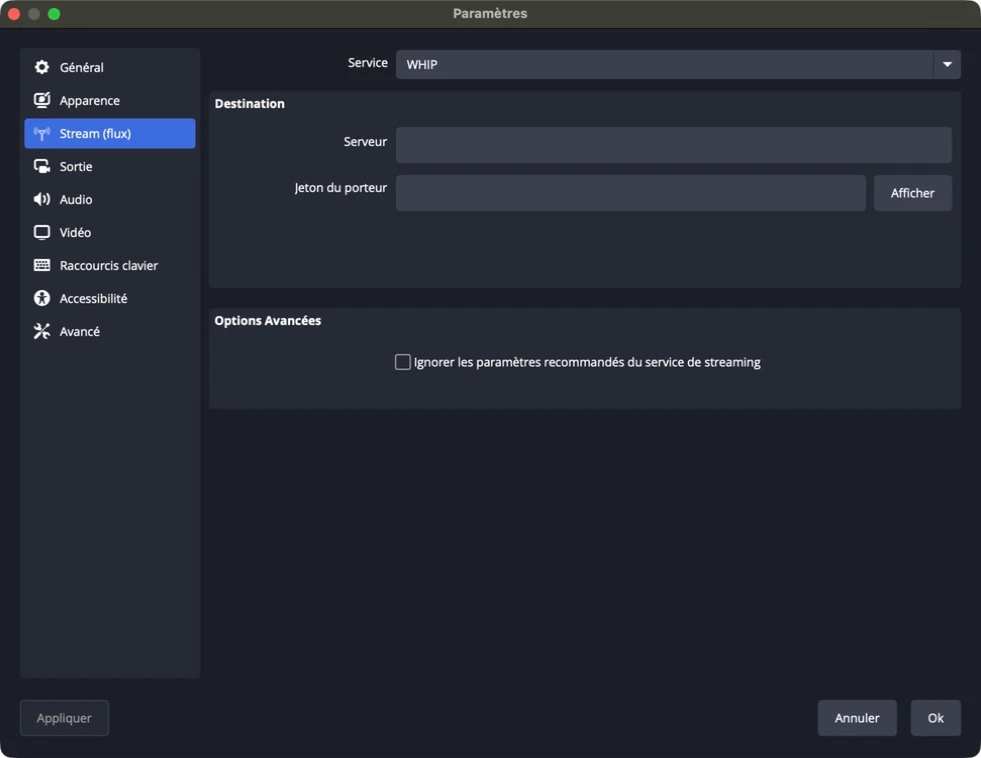 Enlarge image (new tab)
WHIP connection in OBS. No broadcast credentials are shown. 2. Configure video and encoding
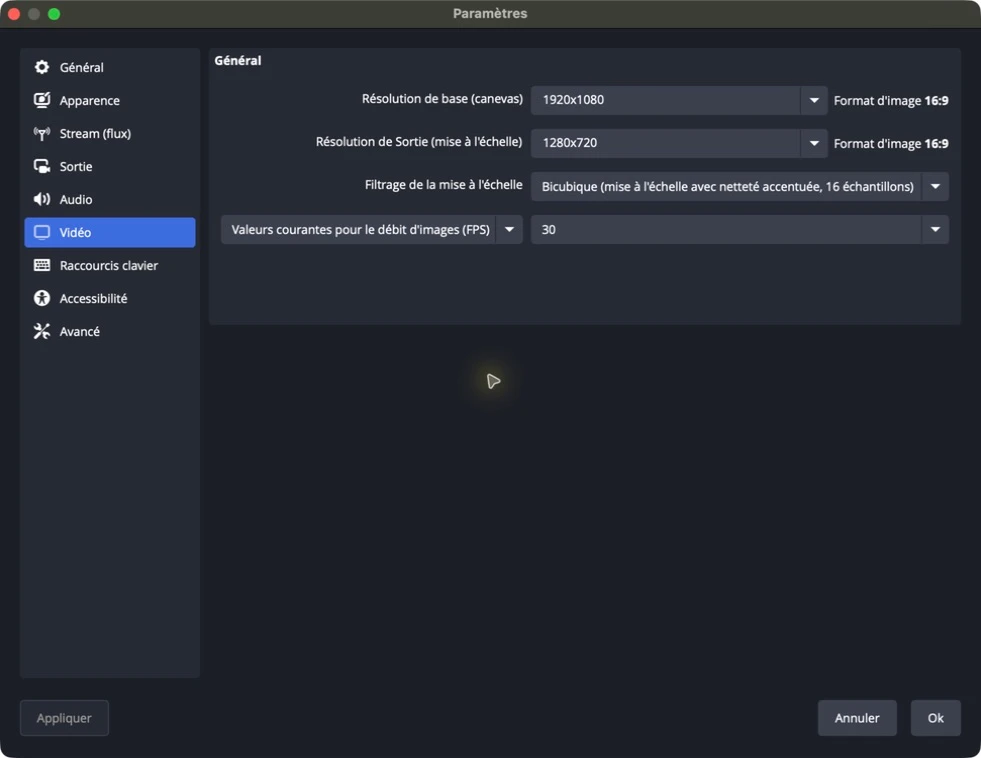
The profile below is a tested starting point at 720p and 30 frames per second. Adjust quality to suit your connection and computer. In Settings → Video, set the output resolution to 1280 × 720 and the frame rate to 30 frames per second. In Output, choose Advanced output mode and open the Streaming tab.
 Enlarge image (new tab)
The stream uses the output resolution: 1280 × 720 here, even though the canvas is 1920 × 1080. Setting Value Video Encoder x264 Rate Control CBR Video Bitrate 2,500 Kbps Keyframe Interval 1 s CPU Usage Preset veryfast Tune zerolatency x264 Options Leave empty Output Resolution 1280 × 720 Frame Rate 30 FPS 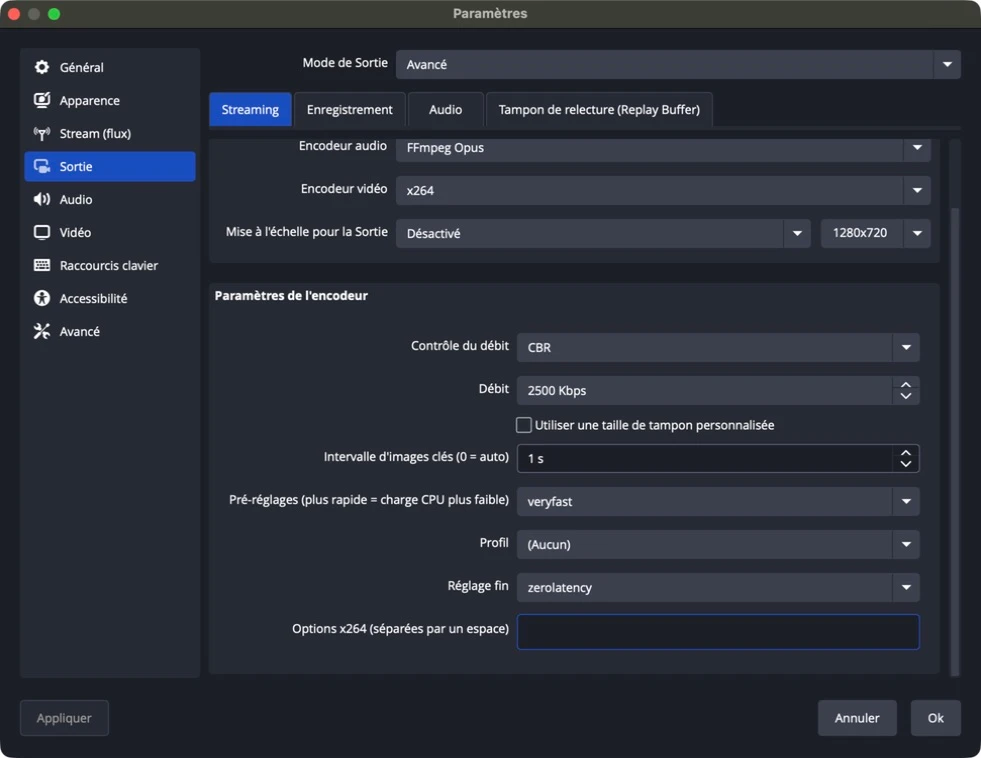 Enlarge image (new tab)
These settings apply to the x264 encoder. Screenshots show OBS in French; labels may vary with your version. 3. Check your stream before selling
- Click Start Streaming in OBS and check that your picture appears in Blisterr.
- In Blisterr, click Launch live to open the broadcast to viewers.
- Open the Live on a second device and check the picture, sound and audio-video synchronisation.
- In OBS, open View → Stats and watch dropped frames, skipped frames and bitrate for several minutes.
- If the picture stutters, check your connection and computer load before starting a sale.
The delay also depends on your connection, computer and viewer playback. The zerolatency setting does not mean that the broadcast arrives instantly.
What about OBS Virtual Camera?
To use your OBS scene with Blisterr camera mode, start the virtual camera in OBS and select OBS Virtual Camera as the camera in Blisterr. Select your microphone in Blisterr as well. The encoder settings above apply to streaming software mode.
How do I manage my shop?
Open your shop from the menu to:
- Edit your shop information.
- Create your Peeks and your Lives.
- Read customer reviews.
Where can I see my sales?
Find your sales in Menu → Sales.
Spot the ones to handle
Filter by status: in progress, to ship, shipped, delivered, confirmed or cancelled.
How do I ship an order?
- Open the order and click Send the label by email.
- Print the label and stick it on the parcel.
- Ship your order.
Labels are generated through Sendcloud for Colissimo, Mondial Relay and, if you enabled it, Chronopost. For a valuable item, choose a tracked and insured shipping option: the declared value is your responsibility.
Can I review the buyer after the transaction?
Yes. Once the order is delivered, you can review the buyer: a score for each criterion and a comment of up to 500 characters.
What are the criteria for reviewing a buyer?
- 💬 Communication.
- 💳 Payment speed.
- ⭐ Overall reliability of the buyer.
How do I resolve a dispute with a buyer?
- Contact the buyer from the order to look for an amicable solution.
- If no agreement is found, write to support@blisterr.com (or on Discord) with your evidence: Blisterr reviews the case.
In case of a refund
If a refund is decided, the seller’s share is recovered: deducted from their scheduled payout, from their wallet or from their next payouts.
How do I contact Blisterr about a dispute?
Write to us at support@blisterr.com, or open a ticket on the official Discord server.
💼 Wallet & payments(8)
What is the Blisterr wallet?
The wallet is your Blisterr balance: an internal ledger that tracks the money that is owed to you (sales, refunds, referral credits) and the money used for your payments. It is not a bank account.
Step 1
Understand your balance
The available balance can be used. Reserved funds are already committed to your ongoing auctions or orders.
Demo data · Click to enlarge ↗ Step 2
Find your transactions
Check the history to follow the movements of your wallet.
Demo data · Click to enlarge ↗
How does the Blisterr wallet work?
Your wallet is credited by refunds, by the payouts of your sales if you are a seller, by referral credits and by any credits granted by our team.
No manual top-ups
You cannot add money directly to the wallet. There are no inactivity fees or account maintenance fees.
To pay for an order, choose:
- Your wallet balance.
- Your bank card.
- Both combined if the wallet balance is not enough.
Can I withdraw my funds?
You are a seller
Your sales are credited to your wallet. You then request a withdrawal to your bank account via Stripe Connect.
You are a buyer
Refunds and referral credits land in your wallet and pay for your next purchases. Amounts you paid yourself by card can be withdrawn without fees back to the original card; referral credits cannot be withdrawn.
For a buyer, the withdrawal is made from the wallet withdrawal screen (Menu → Financial History): the eligible amount is shown there, and the displayed timing is 5 to 10 business days.
Which payment methods does Blisterr accept?
- 💳 Bank card: Visa, Mastercard or American Express depending on availability.
- 📱 Apple Pay or Google Pay.
- 👛 Blisterr wallet.
Card payments processed by Stripe
Blisterr does not store any card data. A card payment is possible from €0.50.
What are the withdrawal fees?
For a seller, the withdrawal to the bank account is free once every 40 days, then charged:
One free withdrawal
Every 40 days.
Additional withdrawals
3% of the amount + €1 per withdrawal.
The minimum withdrawal amount is €1. Any debts owed to Blisterr are deducted before the fees are calculated. For a buyer, the withdrawal back to the original card is free of charge.
When am I paid for a sale?
- Your wallet is credited no later than 20 days after delivery, a safety period set by Blisterr.
- You then request a withdrawal to your bank account: the estimated timing, 2 to 3 business days, is shown in the app when you withdraw.
- Any debts (giveaway delivery, lost dispute, customer refund) are deducted automatically.
How are payments secured?
- Card payments are processed by Stripe, a PCI-DSS Level 1 certified provider.
- No banking data is stored on our servers.
- The seller is only paid after delivery and a safety period; in case of a justified dispute, Blisterr can recover the funds from the seller.
What changes after a strike for an unpaid auction?
A strike is added to your account when a won auction is not paid within 4 days. It expires automatically after 6 months.
Card purchases remain available
A strike does not prevent you from buying by card, in Peeks and in Lives alike, including instant buy and Drop.
To bid while a strike is active, your available balance must cover your bid and all fees, including delivery.
When you bid
The total is reserved and can no longer fund another purchase or auction.
When you raise your bid
The reservation is adjusted.
If you lose or the auction is cancelled
Reserved funds are released.
If you win
Reserved funds pay for your purchase.
Available balance ≠ reserved funds
Funds that are already reserved do not count in your available balance.
📦 Orders & shipping(9)
How are shipping costs calculated?
Shipping costs are calculated automatically from:
- The weight of the item.
- The selected carrier.
- The destination.
Which countries do you deliver to, and with which carriers?
Delivery to France, Belgium, Luxembourg, Switzerland and the French overseas departments (Réunion, Martinique, Guadeloupe, French Guiana). Sellers ship from France.
The carriers offered are Colissimo and Mondial Relay, as well as Chronopost when the seller has enabled it. In a Live, delivery goes to a pickup point, the buyer’s default pickup point.
What happens if there is an error in the shipping costs?
Shipping costs are based on the weight declared by the seller. If there is an obvious gap between the declared weight and the actual weight, the shipping costs may be adjusted.
Can I group several orders from the same shop?
Yes, in a Live: your purchases from the same shop are grouped in a single parcel for 24 hours from the first purchase. Shipping is calculated on the combined parcel and the €0.49 flat fee is charged only once.
How do I get parcel tracking?
- Open Menu → Orders.
- Select your order to see its status and the carrier information.
Keep an eye on your emails
You receive a confirmation email when your order is validated.
What should I do if my parcel is lost or damaged?
- Contact the shop from the order details to look for an amicable solution.
- If there is no solution, contact Blisterr at support@blisterr.com or on Discord.
- Attach the photos and proof that are useful for your request.
Buyer protection
Buyer protection covers an item that is not received or damaged for 30 days. If a refund is decided, it is credited to your wallet.
Who is responsible for shipping errors or carrier damage?
Against a professional seller, the risk of loss or damage stays with the seller until delivery (article L.216-4 of the French Consumer Code). Between individuals, the rules of the French Civil Code apply between the seller and the buyer.
In all cases, Blisterr’s buyer protection applies for 30 days to an item that is not received or damaged.
What are the return conditions?
Private seller
No right of withdrawal between individuals. The 30-day buyer protection still applies.
Professional seller
You have 14 days from receipt to withdraw, without giving a reason, including for an auction. Exceptions provided by law exist (article 8 of the Terms of Sale).
The seller’s status (professional or private) is shown on their shop.
How do I withdraw from a purchase and return an item?
- Notify your withdrawal within 14 days, stating your order number: by email to support@blisterr.com, through the contact form on the website or through the app messaging from the order details (Contact the seller). A model form is provided in the annex of the Terms of Sale.
- Our customer service records your request on behalf of the seller, confirms it to you by email, then processes the cancellation of the order.
- Return the item no later than 14 days after notifying your withdrawal, in the condition you received it. Return costs are at your expense, unless the seller agrees to cover them.
Refund
The refund is credited to your wallet; you can then withdraw, free of charge, back to your original card the amounts you paid by card. The seller may defer the refund until the item is recovered or proof of its shipment is provided.
💬 Messaging & community(9)
How do I talk to shops?
Before buying
Tap Send a message from a Peek.
During a Live
Use the chat of the broadcast.
After buying
Open your order from the menu, then contact the shop.
Each user chooses who can write to them: everyone, the people they follow, or nobody.
How do I report a problem?
- Open the conversation concerned.
- In the message menu, select Report.
For a listing, a comment or a Live, write to us at support@blisterr.com or on Discord, stating the content concerned.
What happens after a report?
- The report is recorded and reviewed by our team.
- Content reported by several distinct users may be hidden or unpublished automatically pending that review.
Can the team suspend or remove content?
Yes. Depending on the situation, our team can:
- Remove the content concerned.
- Restrict an account’s payments.
- Temporarily suspend an account, or terminate it.
Is content moderated?
Texts (item descriptions, comments, messages, reviews and live chat messages) are automatically analysed by AI as soon as they are published. Flagged or suspicious content is reviewed by our team.
What is the first safety rule on Blisterr?
Stay on Blisterr
Make your purchases and sales on the platform. A transaction made elsewhere is not secured and does not benefit from any protection.
Should I share my personal information in messages?
Keep your data private
Never share your personal contact details, banking data or other sensitive information in messages.
What behaviour is forbidden on Blisterr?
- Violence, threats, harassment and hate speech.
- Spam, scams and manipulation.
- Explicit sexual content and child exploitation.
Where can I join the Blisterr community?
Meet other enthusiasts on the official Blisterr Discord:
- Chat about your collections.
- Follow official announcements.
- Take part in events.
👤 My account(14)
Where do I edit my public information?
Step 1
Open your profile
In the menu, tap Edit.
Demo data · Click to enlarge ↗ Step 2
Edit your information
Update your photo, banner, last name, first name, date of birth, bio and social networks.
Demo data · Click to enlarge ↗
Which order statuses are available?
The All filter groups your orders. You can also find them by status:
- In progress.
- To ship.
- Shipped.
- Delivered.
- Confirmed.
- Cancelled.
What details can I find when I click on an order?
- The order number and date.
- The name of the seller.
- The detail of the items and the total amount.
Need a receipt?
You can also download invoices.
What should I do after receiving an order?
Once the order is delivered, you can review the seller on four points:
- 🎴 Item quality.
- 📦 Packaging.
- 🚚 Delivery.
- 💬 Communication.
Give a score for each criterion; the written comment is optional.
Where do I manage my wallet?
Open Menu → Financial History to see your balance, your transactions and the withdrawal options.
To understand every amount
Also read the Wallet & payments section.
Where do I see my favourites?
In Menu → Favorites, find:
- Your ongoing auctions.
- The items you liked.
- The categories and shops you follow.
What does the Security section contain?
This section groups your email address, your username and, if applicable, your seller profile.
Email address
It cannot be changed for security reasons.
Delete your account
This action is final.
How many addresses can I save?
You can save as many addresses as you like.
Step 1
Manage your addresses
Open Addresses from the menu. Use Add an address to save a new one.
Demo data · Click to enlarge ↗
Keep a main address
You must always have at least one main address.
Can I save several pickup points?
Yes, and you can select one when ordering if the seller offers this option. To buy in a Live, a default pickup point is required.
How many payment methods can I save?
You can save several payment methods and choose which one to use for each order.
Keep in mind
To buy, at least one card payment method must be saved.
Where do I enter a promo code?
- Open Menu → Promotions.
- Enter your code to get the discount.
A discount code obtained through referral is pasted in the Promo code field at checkout.
How does referral work?
Share your invitation code with your friends.
For you
Receive €5 in your wallet when your referee’s first order of €20 or more is validated. This credit pays for your purchases and cannot be withdrawn.
For your referee
A €5 discount, valid for 30 days, on their first order of €20 or more.
Your referee activates your code in the app (Invite friends → Activate my code) before their first order, as long as they have never placed one. They then paste their discount code in the Promo code field at checkout.
What does the Settings page offer?
- 🎨 Light or dark theme.
- 🔔 Notifications.
- 🌍 French or English language.
- 🔒 Secure sessions.
Where can I find Blisterr’s useful links?
In Settings → About, find:
- The FAQ.
- The terms of use and terms of sale.
- The official Discord.
💸 Fees & security(8)
Why must a card payment be at least €0.50?
Card minimum: €0.50
Our payment provider requires this minimum amount for every card charge. For a giveaway, the seller always covers the cheapest delivery option.
Only €0.01 to €0.49 left to pay after choosing another delivery option?
- Choose another delivery method.
- Or use your wallet to cover the whole extra cost.
As long as the minimum is not met
No charge below the minimum and no order is created.
What is the buyer protection fee?
6.9% + €0.49 per order
The 6.9% is calculated on the item price, shipping excluded. The €0.49 is charged only once per order with the same seller, and only once for a whole live session.
Example: a €50 item gives €3.45 + €0.49 = €3.94, i.e. €53.94 before shipping. No buyer protection fee is due for a giveaway. All prices are in euros.
When is the buyer protection fee charged?
Order completed
The fee is charged with the payment of the order.
Withdrawal, cancellation or full refund
The fee is refunded in case of withdrawal, cancellation before shipping or a full refund decided under buyer protection.
What is the buyer protection fee for?
- 🔒 The secure payment service.
- 🛡️ The 30-day buyer protection.
- 🛟 The handling of your case by our team if there is a problem.
What are the fees on the seller side?
0% seller commission
No signup or listing fees: you receive the sale price of the item.
Still at your expense:
- Withdrawal fees, under the conditions of the dedicated question.
- Delivery of items offered as giveaways.
The fee schedule may change: any change is announced at least 15 days in advance and does not apply to orders already placed.
What do seller withdrawals cost?
One free withdrawal
Every 40 days.
Additional withdrawals
3% of the amount + €1 per withdrawal.
Your wallet is credited no later than 20 days after delivery. The minimum withdrawal amount is €1; the estimated timing is shown in the app when you withdraw.
How does Blisterr foster a trusted environment?
- 🏪 Every seller application is reviewed manually by our team.
- 🛡️ Content is automatically analysed by AI as soon as it is published, and reports are reviewed by our team.
- 🔒 Card payments are processed by Stripe.
- 🛟 A 30-day buyer protection covers items not received, not as described or counterfeit.
Which good practices should I follow?
- Make your transactions on Blisterr.
- Keep your personal information out of messages.
- Report any suspicious content.
- Pay by card or with your wallet on Blisterr to benefit from buyer protection.
📞 Contact & Support(3)
How do I open a support ticket?
Join the official Discord: discord.com/invite/4suYsG8aQe
Need help?
Open a ticket in the #ticket channel.
What is the support email address?
How do I reach the Blisterr team?
By email
Write to us at support@blisterr.com: our team replies by email.
With the form
The contact form on the website sends your message to our team.
On Discord
Open a ticket on the official Discord server.
No results
Try different keywords, or reach out to us directly.