Guide · Limits
My limits: set your own budget on Blisterr
A spending cap per day, week or month, from €1 to €10,000: lower it instantly, raise it after 12 hours, remove it after 2 days, with alerts at 80%.
By Blisterr Team10 min read
- €10,000maximum cap per period
- 12 hafter your request, for an increase to take effect
- 2 daysafter your request, for a removal to take effect
- 80%of a limit: you get an alert
The adrenaline of a Live is part of the joy of collecting. To keep it that way, Blisterr lets you set your own budget in “My limits”: a spending cap per day, per week or per month, which you choose with a clear head, and a 24-hour break when you want to step away. This guide explains where to set them, what they block, what counts toward them and how to change them.
What is “My limits”?
“My limits” is a setting in your wallet. It is optional: as long as you haven’t set a limit or activated a break, nothing is blocked for you. You can set up to three independent caps:
- per day, calculated over the last 24 hours;
- per week, calculated over the last 7 days;
- per month, calculated over the last 30 days.
These are rolling periods: they don’t reset at midnight or on the first of the month; they always look back from the present moment. Each cap ranges from €1 to €10,000. If you set several, the strictest one applies at any given moment.
Where do you set your limits?
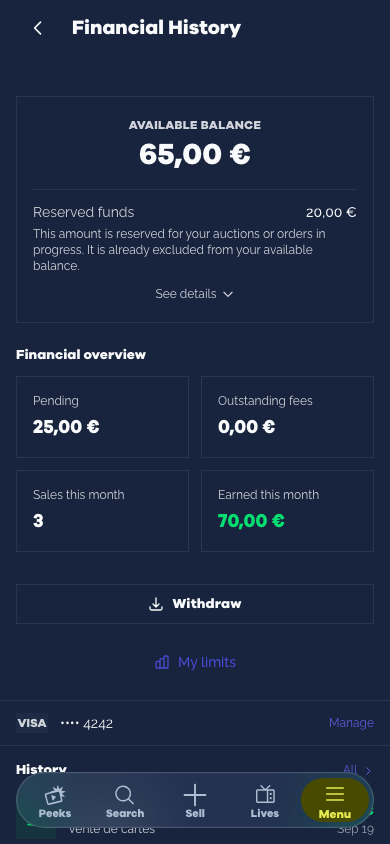
On the website, open the menu, then “Financial History”, your wallet: the “My limits” button is below “Withdraw”. On desktop, you can also get there from the wallet button in the header. In the mobile app, the “My limits” screen is also in your wallet.
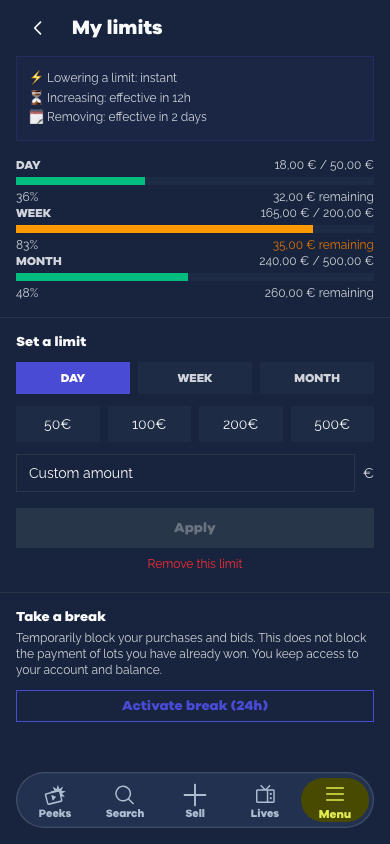
Choose the period (day, week or month), then a quick amount (€50, €100, €200 or €500) or an amount of your choice, and confirm. The screen then shows, for each period where you have set a cap, the amount used, your cap and how much you have left. The amount used includes your paid purchases and your bids or purchases in progress.
Lower instantly, raise with a cool head
The three timings are shown at the top of the screen:
- Lowering a limit is instant. So is setting your first limit.
- Raising a limit takes effect 12 hours after your request. Until then, your old limit still applies.
- Removing a limit takes effect 2 days after your request. It stays active during that time.
Each period has its own effective date: an increase of your daily limit does not wait for a removal you requested on the monthly one. Your pending changes are shown on the screen and you can cancel them before they take effect: cancelling clears all your pending changes at once. Lowering a limit also cancels any increase or removal still pending for the same period: your latest choice is the one that counts. This is deliberate: a decision made calmly shouldn’t be undone in the heat of the moment, in the middle of a hard-fought auction.
What your limits block
As soon as a bid or a purchase would take you over a limit, Blisterr refuses it, with an error message:
- in a Live: your bids, your Drops and your instant buys;
- on Peeks: your bids on classic or silent auctions;
- in your cart: paying for your instant buys and your Peek Drops.
The check always covers the total you will pay: price, buyer protection fees and shipping. For a Peek auction, it is your maximum amount, plus the fees and the most expensive shipping to your saved addresses and pickup points. If you have a limit, the bid is refused when shipping cannot be calculated for any of them, for example if the shop doesn’t ship to any of your addresses: a message then prompts you to add a delivery address.
If your limit cannot be checked at that moment (a temporary incident), the bid, the Live purchase or the payment of a cart that contains an instant buy or a Peek Drop is refused: try again in a few seconds. No bid or purchase goes through without this check.
An auction in progress already counts
An auction you are taking part in counts toward your budget even before it is paid:
- an automatic bid counts for its maximum amount;
- on the same sale, a new bid replaces the previous one rather than adding to it; a lower bid, or a refused one, does not reduce what is already committed;
- on a Peek, a withdrawn bid no longer counts, and neither does a classic auction you were outbid on or lost;
- in a silent auction, nobody is outbid before the end: your bid counts until the auction closes, then stops counting if you don’t win the lot;
- in a Live, your bid keeps counting, even once outbid, until the sale of the lot ends: it stops counting if you don’t win it;
- an auction you won counts until it is paid, or until the 4-day payment deadline ends;
- on a Peek, if you were outbid and the highest bidder withdraws their bid, you are not put back in the lead while a limit or a break is active, even if your limit would have allowed it.
When you pay for your cart
As soon as your cart contains an instant buy or a Peek Drop, Blisterr checks the total of all your orders together, fees and shipping included, on top of what you have already spent or committed. If that total takes you over a limit, or if a break is in progress, your auction wins are still paid and your giveaways still processed. However, all your instant buys and Peek Drops stay in your cart, including those that would have gone through on their own. The amount charged is therefore lower than the total shown before you paid: on the website, the confirmation page shows what was not paid and why. If your cart only contains instant buys or Peek Drops, the payment is refused.
When items are left in your cart, the discount from any promo code is recalculated based on what is actually paid and no longer applies to those items. If the code is no longer valid for that amount (for example, if the minimum purchase is no longer met), your auction wins are paid without the discount and the code is not used up: you can still use it on a future purchase. On the website, the confirmation page tells you so.
What your limits never block
A won auction must still be paid. Paying for a lot you have already won, on a Peek or in a Live, is never blocked, even during a break: in a Live, it is charged automatically at the end of the sale (you have 4 days to settle it if it fails); for a Peek, it must be paid within 4 days, as set out in the terms of sale.
Settling a payment debt and retrying the payment of an order already placed, which are commitments you have already made, are never blocked either, and neither are giveaways, which are free.
The 24-hour break
Need to step away? In “My limits”, the “Activate break (24h)” button blocks all your new bids and all your new purchases for 24 hours, on Peeks as well as in Lives, even if you have not set any limit. You keep access to your account and your balance, and the lots you have already won still have to be paid. An auction where you are already in the lead when you activate the break is not cancelled: if an automatic bid was in place, it keeps outbidding up to the maximum set before the break, and if you win, you have to pay. During the break, you can neither bid again nor raise that maximum.
A break cannot be cancelled before the 24 hours are up: that is what makes it useful on the night of a Live.
What counts toward your budget
Every payment counts for its full amount: price, buyer protection fees and shipping, whether it is paid with your wallet, with your card or both. The auctions in progress described above are added to it, as are the orders of a cart that contains an instant buy or a Peek Drop, until they are paid: for 30 minutes, or about 1 hour if a payment is still waiting for your approval (a bank authentication, for example). When you pay, the payment replaces these orders in the calculation, never counting twice; if an order is cancelled or expires, its amount is released.
A failed Live payment also counts while it is still to be settled, until it is settled, cancelled or the 4-day deadline ends. Settling it is never blocked.
Your payments from the last 30 days are taken into account: when you set a limit, what you have already spent in the period counts straight away, as do your Peek auctions where you are already in the lead and your wins not yet paid. A refund is deducted from every period that includes the date of the refunded payment.
Alerts at 80% and 100%
As soon as a bid, a purchase or paying for your cart takes you past 80% of a limit, you receive a notification and an email. You are alerted the same way when you reach it. Each crossing gives a single alert, at the time of the bid or the purchase, not a second time at payment. If you drop back below the threshold (auction released, refund, payment outside the period) and cross it again, you receive a new alert. If a single purchase takes you past 80% and 100% at once, you only receive the “limit reached” alert. If you set a limit you have already exceeded, the screen shows it straight away.
How to choose your limits
Start from your collection budget
Ask yourself how much you are willing to put into your collection over a month, then set that amount as your monthly limit. A lower daily limit stops you from spending the whole month’s budget in a single evening at a Live.
Combine it with a cap per lot
Limits protect your overall budget. Before a Live, also set yourself a maximum price for each card you are going after, as our guide to live auctions recommends.
Lower it before a big Live
Lowering a limit is instant: reduce it just before a highly anticipated Live, then raise it again the next day with a cool head. To block all buying and bidding for 24 hours, activate the break.
Frequently asked questions
Are limits mandatory?
No. They are optional and no limit is set by default.
What is the maximum amount of a limit?
€10,000 per period. The minimum is €1.
Can I remove a limit?
Yes, period by period. Removal takes effect 2 days after your request; until then, you can drop it by cancelling your pending changes.
Can I cancel a break?
No. A break lasts 24 hours and cannot be cancelled before it ends, even if no limit is set.
Do my past purchases count?
Yes: your payments from the last 30 days are taken into account as soon as you set a limit, in every period that includes them (a payment from three days ago counts toward the week and the month, not the day).
Why was my bid on a Peek refused?
The check covers the total: your maximum amount, the buyer protection fees and the most expensive shipping to your addresses and pickup points, on top of what you have already spent or committed. Without a saved address, you cannot bid at all, with or without a limit. With a limit, the bid is also refused when shipping cannot be calculated, for example if the shop doesn’t ship to any of your addresses: add a delivery address it ships to. During a break, every bid is refused until it ends.
Does a limit mean I don’t have to pay for an auction I won?
No. A won auction must be paid, whether or not your limit has been reached: automatically at the end of the sale of the lot in a Live, within 4 days for a Peek. Limits are there to stop you before you bid, not afterwards.